I Built a Day Planner with Claude That Shapes My Day Through Conversation
This is an English translation of the Japanese original, made with an LLM (Claude Opus 5.5). If anything is unclear, the Japanese version is authoritative. Read the Japanese original
For the Japanese original, the author planned the article and checked its content and references, and an LLM (Claude) was used to organize the structure and write the text. The author is responsible for the content.
When you work alone at home, the line between life and work gets blurry. I often notice that I have been spacing out and wasting time.
Then the work does not move forward. As a freelancer, work not moving forward translates directly into no income.
Even so, filling a planner with detailed plans and acting on them while looking at it is hard for me. Moving when a notification arrives at a set time also feels like following orders from decisions made in the past, not like making my own future.
On the other hand, I have been a Twitter user for many years. Posting short notes about daily life, letting them flow by and getting reactions is in my bones.
So I decided to try a form that combines the two. Like Twitter, I post short logs and get reactions, while moving forward by declaring "I'm going to do this now". It looks like a planner, but the substance is a conversation. Only the slots I decided on are kept as plans; slots without a set use stay undecided. On top of that, I post short lines to Claude each time, such as "I'm going to do this now", "this moved forward" or "I'm stuck". Claude does not give instructions or orders; it acknowledges what I decided and did, and replies with what moved forward. By piling up this conversation through the day, a day takes shape as a result.
The main character of this page is that conversation. The timetable is placed as a background that shows which slot it is now.
I built the page as a Claude artifact (a web page that can be published on claude.ai), and refined it over about half a day while chatting. This article introduces how the page is built, and a problem I thought about along the way: how to get data from outside into the page. The latter is the same problem that comes up when building products that connect devices and the cloud.
Similar ideas
There are several ideas close to this way of working. Interstitial journaling, where you briefly write "what I just finished" and "what I'll do next" each time you switch tasks. A "done list" that records and piles up what you did. The Japanese hashtag "#今日の積み上げ" (today's progress), where people declare their plans on X in the morning and report at night. The daily log of a bullet journal, where the day's page fills with logs. All of them share the idea of moving the day forward by writing and declaring, rather than being bound by plans. My version puts Claude at their meeting point, as someone who replies.
The page I built
The page is a single vertical column so it is easy to read on a smartphone, and tabs at the bottom switch between three screens.
- Today: the latest exchanges and a list of the timetable. Only the current slot is shown at normal strength; finished slots are faint and upcoming slots slightly faint. A small round clock in the upper left shows the time left in the current slot as an arc
- Notes to Claude: a timeline of my short posts and Claude's replies, newest first. The record of the day piles up here
- Notes: memos of things to remember, organized every night from the exchanges
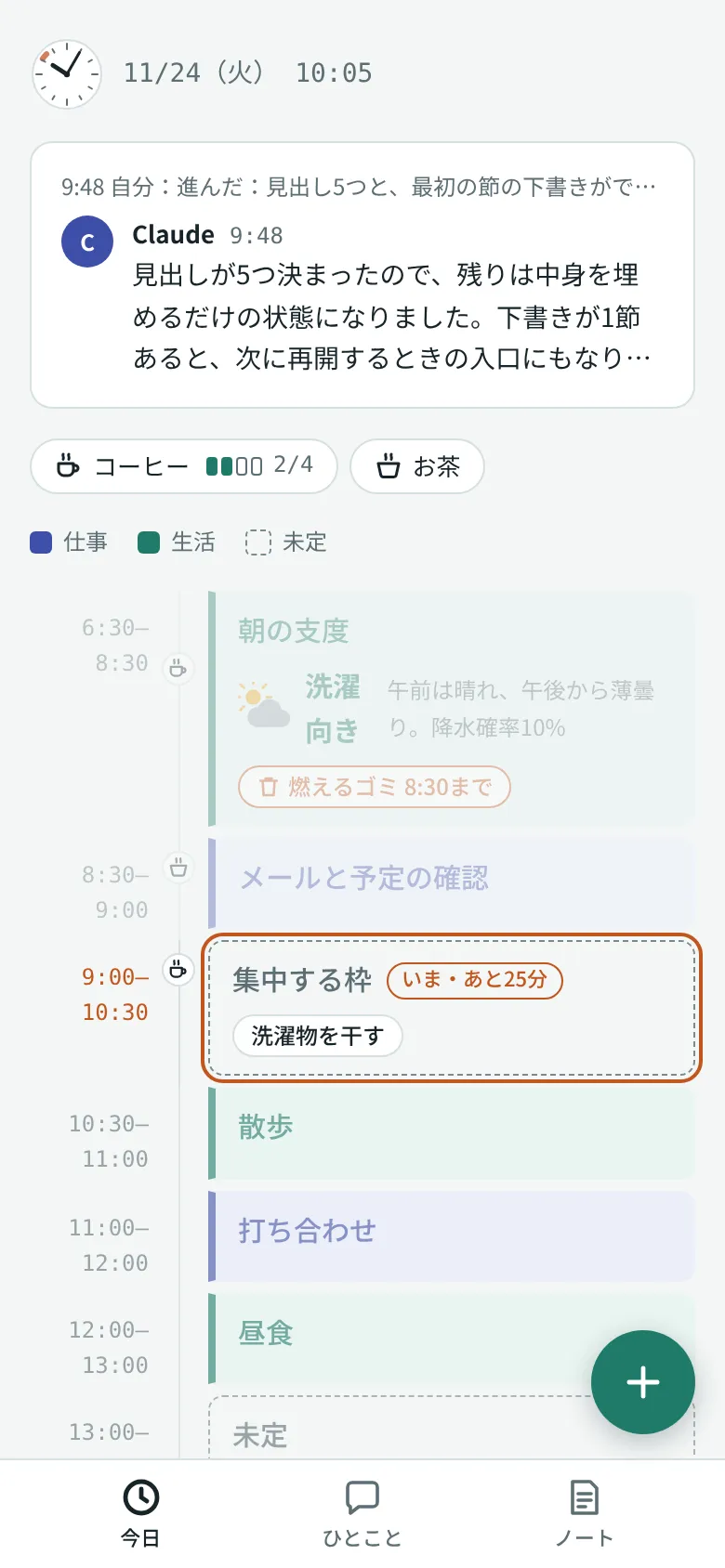
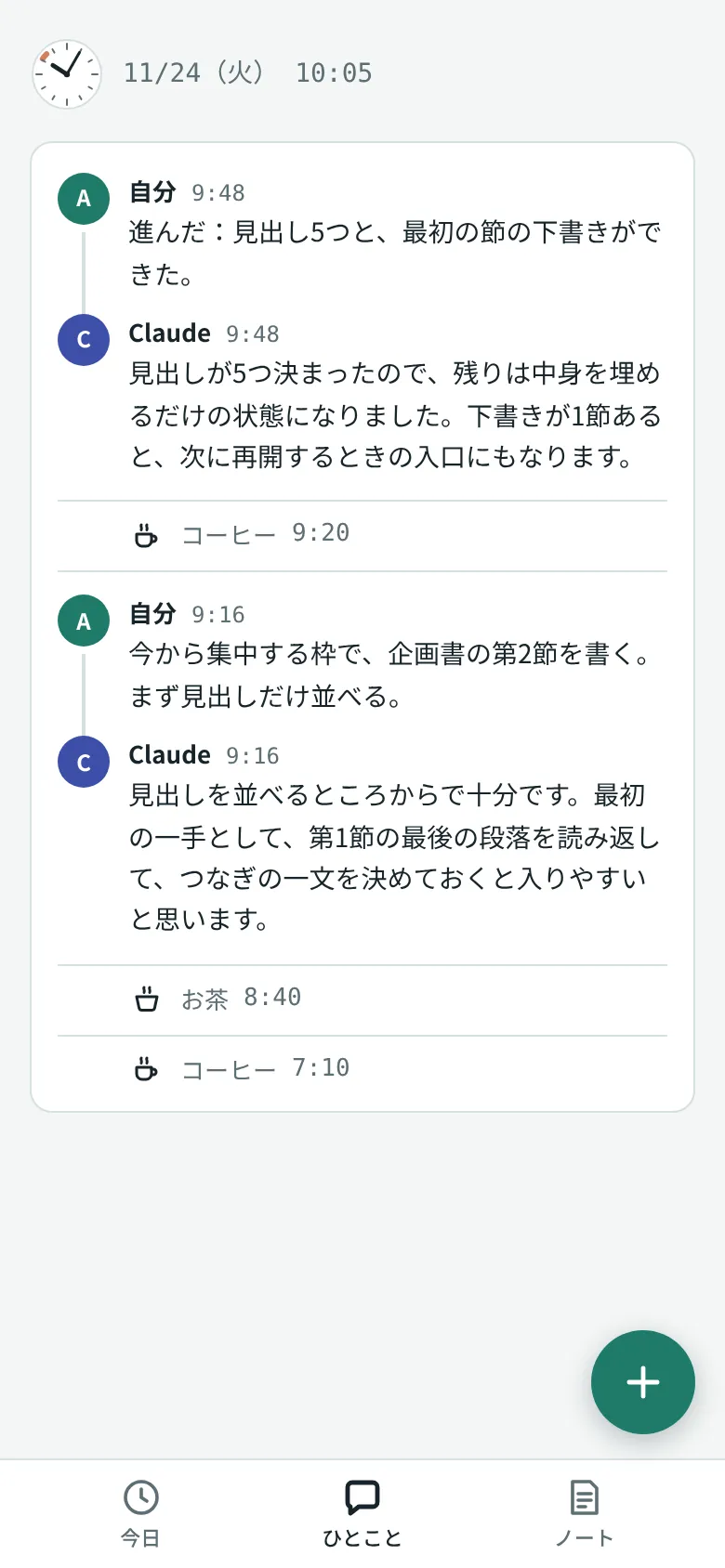
Pressing the round button in the lower right opens the posting screen. The posting flow is modeled on X (formerly Twitter): a timeline with only me and Claude in it.
Show only what is needed that day
In the first version, each slot had a description like "get up when the curtains open". But since I made the timetable myself, the descriptions are not something I read every day. I removed them and show only the information I use to make decisions in that slot on that day.
- The morning slot shows a weather icon and a "good / so-so / bad for laundry" verdict. The weather is written to the page's database by Claude running as a scheduled task at a fixed time every morning, after checking the forecast
- Only on garbage days (Tuesday and Friday), the morning slot shows "burnable garbage by 8:30"
- Some slots are hidden only on particular days, such as holidays. On a weekday when such a slot disappears, a one-line note is added to that day's timeline
Recording life events
I made coffee, tea and the toilet (number one and number two) recordable with a single button press. Drinking coffee marks a break between work. The toilet is similar: after going to the toilet during work, I often find an hour has passed while I spaced out. I added these on a hunch that recording such break events once might reveal habits in my behavior. The records stay in the page's database by date, and appear as icons in a thin vertical lane on the left side of the timetable, positioned in proportion to the time. Records that come in quick succession are drawn slightly offset and overlapped.
At first, I decided which slot a record belongs to by "the slot that contains that time". But I noticed that when a slot is hidden on a particular day, a gap appears between slots that day, and records in that gap were not shown anywhere. So I changed the design to place records on a time axis in a lane outside the slots, not inside them. That way, times in the gap fall into the lane of the previous slot.
Claude that replies
When I post to "Notes to Claude", the code in the page asks Claude for a reply. No API key is used. The page asks claude.ai, which is displaying it, to make the request, and claude.ai calls the model as the logged-in user.
The model does not remember the conversation, so every time, the page sends the following together:
- Instructions on how to reply (keep it short, acknowledge rather than instruct or order, and so on)
- The current time and slot, today's timetable, the weather, today's records
- The notes organized every night and the end of the previous day's exchange
- The most recent part of today's exchange
The recorded events are passed only as background for the reply. There is no point in being told "you went to the toilet this many times" every time. However, since these are instructions to the model, they are not always followed. I fix things when they bother me.
Outside data cannot be pushed in
Next, I thought about automating the coffee record with a sensor, detecting the coffee maker's operation instead of pressing a button. The problem was how to deliver an event that happens outside to the page.
Inside the page, the database is read by subscribing to changes, so when I add a record from the chat, it appears immediately in the open page. The inside of the page is already event-driven.
However, as far as I could confirm, there is no entry point for an outside device to write directly to this database. An artifact is a mechanism that only serves published files, and its code runs only in the browser of someone who has the page open. There is no place to put server-side code that accepts a POST.
Picking up information that people do not enter by hand is the natural direction in IoT. But with how Claude currently hosts pages, pushing from outside is not possible, so the data has to be placed in a cloud service first, and the page goes to read it. To build something that works first, the setup would be as follows (at the time of this article, I have not built it yet):
- Writing: publish Apps Script attached to a Google spreadsheet as a web app; an HTTPS POST to its URL appends one row
- Reading: the page reads it through Claude's Google Sheets connector and mixes it into the timeline
- Button: at first, no hardware; POST from an iPhone shortcut
In other words, device to cloud is push, cloud to page is polling, and database to screen is push. For a coffee record, a delay of one or two minutes is no problem.
In products that connect devices and the cloud, where there is an entry point and where there is not almost decides the possible architecture. This case was no different.
To build the same thing
I will not publish my own page because it contains records of my life, but building one is not difficult. If you ask Claude in a chat like this, you can make something of the same shape. Rather than asking for everything at once, asking for the first item, running it, and adding what bothers you as you use it gives you something that suits you better.
-
Ask for a page that shows the timetable
Please make an artifact that shows my weekday timetable. Assume it is viewed on a smartphone, in a single column. The timetable is as follows (write your own schedule here). Show only the current slot at normal strength, and make finished and upcoming slots faint. Put a small round clock in the upper left that shows the time left in the current slot as an arc. -
Add buttons for recording life events
Let me record the time I drink coffee and tea with a single button press. Keep the records in the page's database by date, and let me undo right after pressing. Make a thin vertical lane on the left of the timetable, and place the records there as icons at positions proportional to the time. I want to keep coffee to four cups a day, so show today's count on the button. -
Add a section for short exchanges with Claude
Add a section where Claude replies to short posts. Keep posts and replies in the database by date. Replies should be two to four sentences, and should not give instructions or orders; reply as someone who acknowledges what I decided and did. When making a reply, pass the current time and slot, today's timetable and today's records as context. -
Make the flow like X
Put a tab bar at the bottom to switch between "Today", "Notes to Claude" and "Notes". Post from a screen opened with a round button in the lower right, and show the notes as a timeline, newest first. Show Claude's reply right under my post, and put the drink records into the same flow in time order. -
Make the weather and the nightly summary scheduled tasks
Create a scheduled task that, every morning at 5:40, checks the weather forecast for my city and writes whether it is good for laundry to the page's database.
Also create a scheduled task that, every night at 23:30, reads the day's exchanges and updates the notes of things to remember.
The database, requests to Claude, voice input and so on are provided as artifact features, so you do not need to set up your own server. The available features may differ by account and by client (browser, desktop app, smartphone app).
Refining the UI by chat
I refined the UI by showing the page next to the chat and asking for fixes whenever something bothered me. Rather than writing a perfect specification from the start, I used it and said what bothered me.
- Remove what I already know, such as the title and descriptions, from the screen
- Knowing the current slot is enough, so drop the large "current slot" card and show it with the timetable's shading instead
- Fonts looked mixed while typing Japanese, so stop using web fonts and use the device's fonts
- It wobbled left and right in the Claude app on iPhone, so prevent horizontal movement
- Send a post with Shift+Enter (not with the Enter that confirms Japanese conversion)
Even without specifying the look in detail, if you say what is bothering you, proposals for the layout and presentation come back.
For today, this is as far as it goes: I built this kind of setup. I will use this page for a while, and write again if I notice anything.